How to Draw on Video to Analyze Technique
Published and updated: August 13, 2026
Telling an athlete their elbow drops is a sentence they have to imagine. Drawing the line their elbow crosses is something they can see. That is the whole reason coaches draw on video: it moves the correction out of language and onto the movement itself.
The tools matter less than the discipline of using few of them. A frame with one line and one angle reads instantly. The same frame with six overlapping shapes becomes a puzzle the athlete solves instead of a correction they apply.
Pick the shape that answers the question
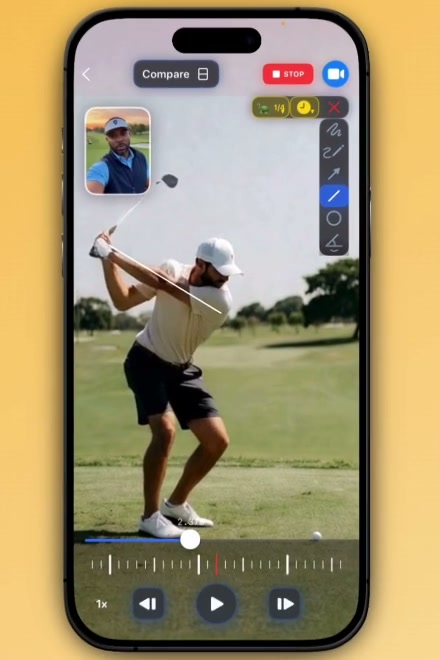
WithCoach gives you freehand and freehand arrow for tracing a path, straight arrow and straight line for direction and alignment, circle for drawing attention to one joint or contact point, angle for a joint measurement, and rectangle for bounding a region. An orientation guide helps when the camera itself was not level.
Match the shape to the coaching question rather than to habit. Alignment questions want a line: spine angle at address, shoulder level at foot strike, the vertical through the ball. Path questions want freehand or an arrow: where the hands travelled, where the racquet head went. Position questions want a circle: the lead knee at contact, the hand at release. Angle answers a question only when both limbs are visible in the same plane — measuring an angle on a limb pointing toward the camera produces a number that means nothing.
You can hide the tools you never reach for. The palette is per-coach, so a swim coach who lives on freehand and circle does not scroll past a rectangle every time.
Let the annotation expire
A drawing that stays on screen through the whole clip stops being a correction and becomes clutter — by the follow-through it is marking a position the athlete left half a second ago. Auto-fade clears the drawing after 1, 1.5, 2, 3, or 5 seconds.
Short settings suit fast, single-moment events: contact, impact, foot strike. Longer settings suit a shape the athlete needs to hold in mind across a phase, like a swing plane through the downswing. Off is the right choice when you are building a still frame to export, where the drawing is the whole point of the image.
Slow the video instead of freezing it
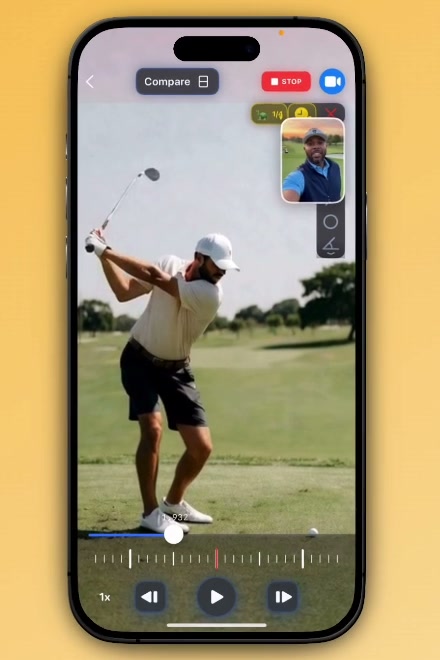
Most annotation happens on a paused frame, which is fine for static geometry and wrong for anything that travels. A pause tells you where the knee was. It cannot show you the route it took.
WithCoach can drop playback to 1/2x, 1/4x, or 1/8x while you draw. At 1/8x, a movement that takes a fifth of a second in real time takes over a second and a half on screen — enough to trace a joint's actual path with a finger rather than reconstruct it from two still frames. Coaches use it most on the phases that are invisible at full speed: the transition at the top of a golf swing, the catch in a freestyle stroke, the moment a pitcher's hip opens.
Draw what the movement should do, not what the body should feel
How you word the correction attached to a drawing changes how well it is learned. A review of fifteen years of attentional-focus research found that directing a performer's attention externally — to the effect of the movement — improves both performance and learning compared with directing it internally, at the body itself, and reports that advantage holding across different tasks, skill levels and age groups [1].
Drawing is unusually good at this, because a shape on the screen is external by nature. A line showing the path the club head should travel is an external cue. The caption "rotate your forearm earlier" pulls attention straight back to the body. Same drawing, different learning. Mark the target, the path, the contact point — and let the body work out how to get there.
One correction per review
The constraint that improves feedback most is not a drawing tool. It is a limit on how many corrections one review carries. An athlete can test one change on the next attempt. Given three, they will blend all three imperfectly and neither of you will know which one moved the result.
It is also worth knowing what the evidence says about the medium itself. A trial sequential meta-analysis of feedback in physical education put the pooled effect of feedback on motor skill learning at SMD 0.47 (95% CI 0.01–0.93). Broken down by type, visual feedback reached 0.71 and visual combined with verbal feedback reached 1.15 — while verbal feedback on its own showed no significant effect at all [2].
Talking a correction through was the weakest option measured. Showing it and talking it through was the strongest.
Han et al. (2022), meta-analysis of feedback in physical education
Draw the one thing, say the one thing, and let the athlete take the next attempt. The drawing is worth what the next repetition proves.
Research cited
- Wulf, G. (2013). Attentional focus and motor learning: a review of 15 years. International Review of Sport and Exercise Psychology, 6(1), 77–104. doi:10.1080/1750984X.2012.723728 An external focus of attention — on the movement effect rather than on the body — improves both performance and learning, and the review reports the advantage holding across different types of tasks, skill levels, and age groups.
- Han, Y., Syed Ali, S. K. B., & Ji, L. (2022). Feedback for promoting motor skill learning in physical education: a trial sequential meta-analysis. International Journal of Environmental Research and Public Health, 19(22), 15361. doi:10.3390/ijerph192215361 PMID 36430079 PMC PMC9690366 Pooled across studies, feedback improved motor skill learning (SMD 0.47; 95% CI 0.01–0.93; p = 0.04). Visual feedback reached SMD 0.71 and visual combined with verbal feedback SMD 1.15, while verbal feedback on its own showed no significant effect.
Frequently asked questions
Which drawing tools does WithCoach include?
Freehand, freehand arrow, straight arrow, straight line, circle, angle, and rectangle, plus an orientation guide, undo, and clear. Each tool can be hidden from the palette, so the toolbar shows only the shapes you actually use.
Can an annotation disappear on its own?
Yes. Auto-fade clears a drawing after 1, 1.5, 2, 3, or 5 seconds, or stays off. It suits a correction you want seen at one moment of the movement without covering the frames that follow.
Does the video keep playing while I draw?
You can slow it instead of stopping it. Drawing can drop playback to 1/2x, 1/4x, or 1/8x while your finger is down, so a line can follow a moving joint rather than mark a frozen frame.
Do drawings stay with the video after I close it?
Annotations belong to the review you are building, and an exported or shared review carries what you drew. Free exports and shares include a WithCoach watermark.
Draw the correction instead of describing it
WithCoach includes 3 lifetime comparisons on Free; Pro and coaching plans unlock unlimited comparisons.
Create 3 comparisons freeRelated: How to use video analysis to improve athletic technique · Why frame-accurate sync matters · WithCoach vs OnForm · WithCoach vs CoachNow